
Quick response
Quick Answer: The most reliable VIN location for the Mitsubishi Outlander is the stamped code on the engine-bay firewall (under the wiper cowl area). It’s typically stamped into the metal firewall near the center, slightly offset to one side. Expert tip: wipe dust/grime off first so the characters don’t disappear in shadows.
![VIN location Mitsubishi Outlander Outlander II [2007-2007]](/_astro/vin-location-mitsubishi-outlander-ii-2007-2007.BzYkUxf9.webp)
Where is the VIN number in Mitsubishi Outlander (Outlander II [2007-2007])?
This guide covers the VIN/chassis number locations used on the Mitsubishi Outlander II [2007-2007].
Chassis Number Locations
Engine Bay – Firewall / Cowling Stamp 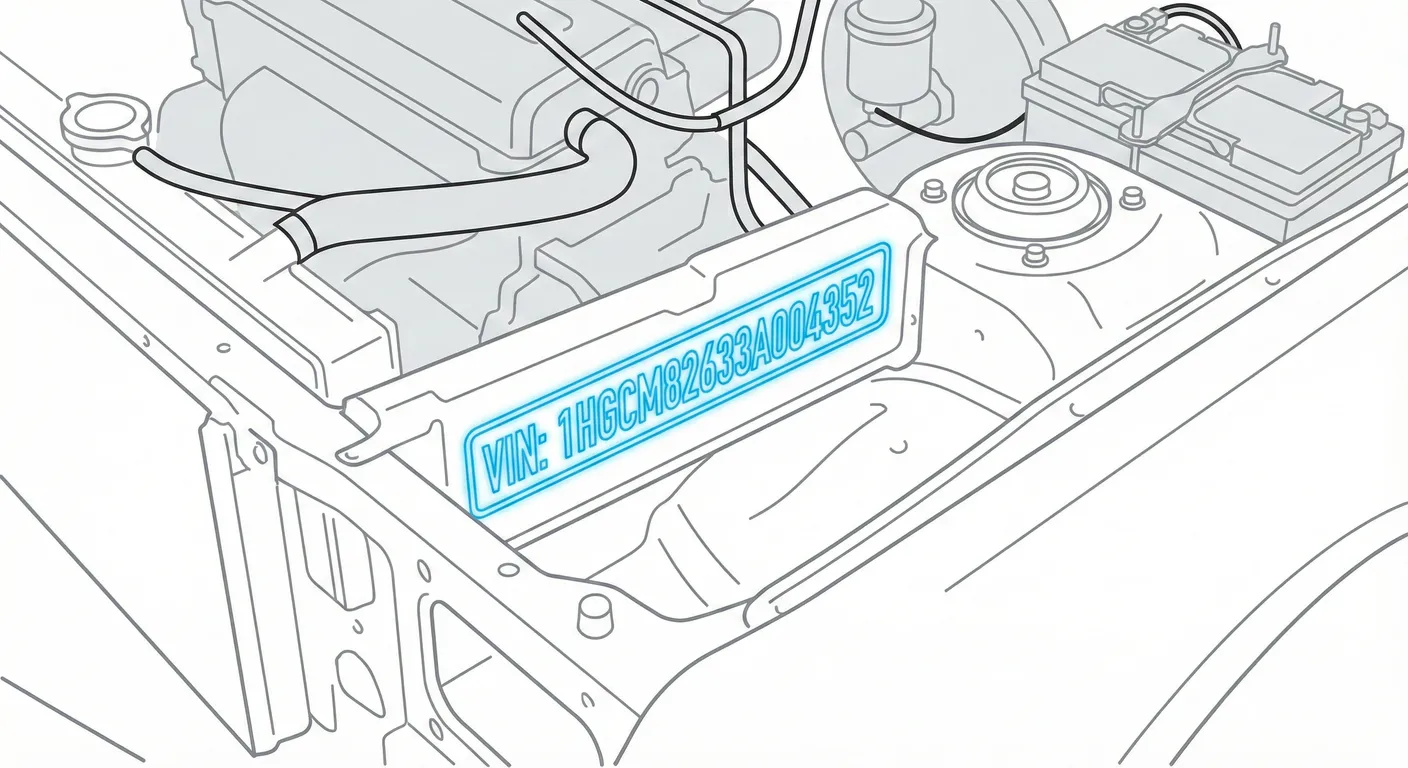
- Where to look: Open the hood and look at the metal firewall (the panel between the engine and the cabin), below the windshield wiper cowl and above the engine. The code is stamped directly into the metal and is usually near the center, slightly offset.
- Access: Generally easy to spot with the hood up, but it can be obscured by dust/grime—scrub it with a rag and a little degreaser if needed.
- Note: Many Mitsubishi layouts look similar across markets; on RHD cars this stamp may appear slightly toward the passenger side—use the same “near center, slightly offset” approach on LHD cars.
- Tip: If the stamp is dirty or the paint/metal contrast is weak, use ScanVin.app’s VIN scan in High Contrast AI mode after wiping the area so you don’t misread a character.
B-Pillar / Door Jamb Manufacturer Plate 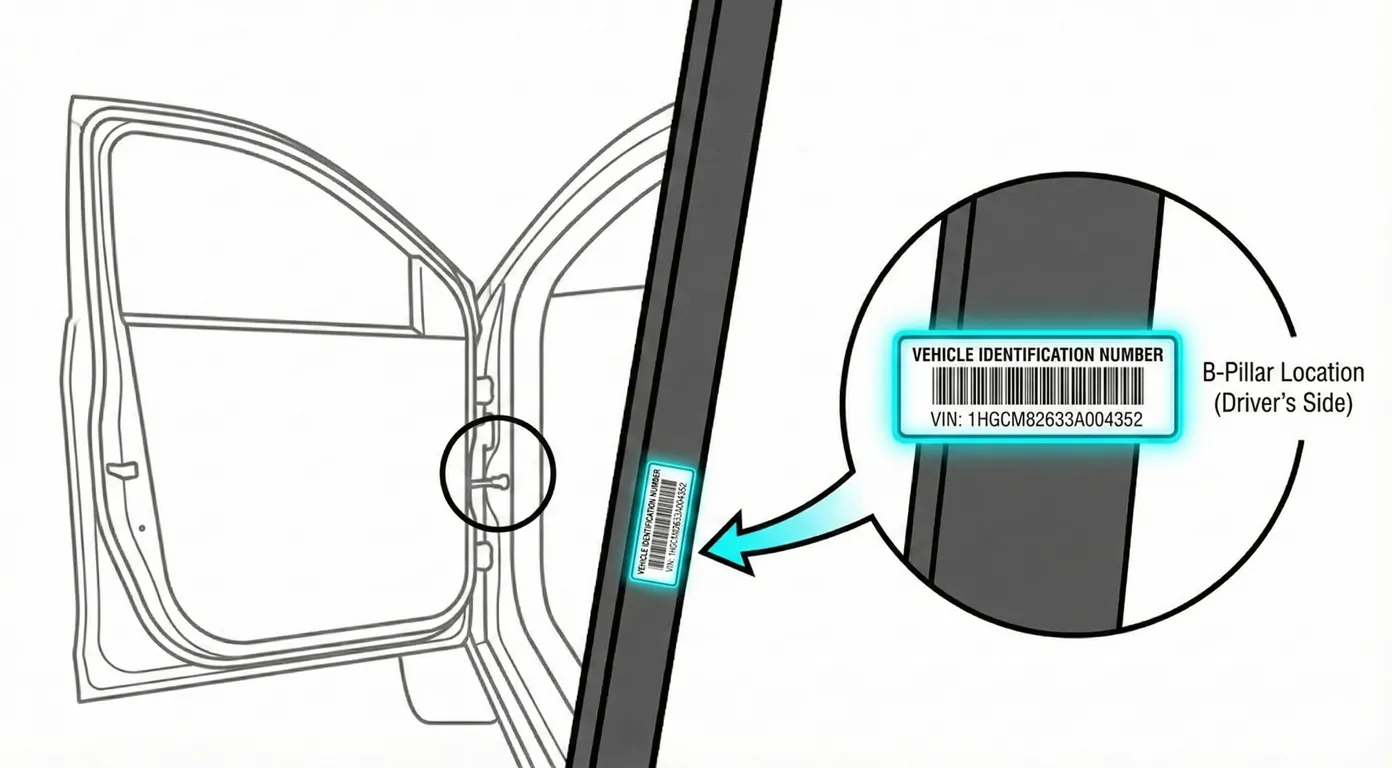
- Where to look: Open the front passenger door and check the lower section of the B-pillar/door jamb for the manufacturer plate (sticker or riveted plate). This plate typically lists the model info and the chassis/VIN-style identifier.
- Access: Very easy—standing access, no tools. The only issue is wear/scratches from years of door use.
- Note: This is one of the best “clean” sources because it’s not exposed to engine-bay dirt.
- Tip: If the plate is vertical and you’re fighting glare or blur, scan it directly with ScanVin.app so the app captures the full string cleanly without transcription mistakes.
Engine Number – Stamped on Engine Block (Not the VIN)
- Where to look: The engine number is stamped on a machined flat pad on the engine block (often deep in the bay, near major castings/attachments).
- Access: Harder—usually deep in the engine bay, commonly greasy, and you’ll want a flashlight and some cleaning before it becomes readable.
- Note: This is not the VIN, but it’s often checked during inspections/registrations alongside the chassis/VIN.
- Tip: Because it’s dark and awkward to reach, use ScanVin.app’s phone scanner to capture the number quickly while you’re leaned in, instead of trying to write it down from a bad angle.
Common Problems & Troubleshooting
- Firewall stamp “missing”: It’s usually just covered in dust/overspray—wipe, then look again with light angled across the metal to make the stamping pop.
- Engine number unreadable: Expect oil/road grime and poor lighting; clean the pad and use a flashlight to avoid mixing up characters like B/8 or S/5.
- Sticker/plate issues: A door-jamb sticker can be damaged or replaced—always cross-check the firewall stamp and paperwork if something looks tampered with.
Frequently Asked Questions
Where is the VIN on Mitsubishi Outlander?
Check the stamped code on the engine-bay firewall under the wiper cowl area, and the manufacturer plate on the B-pillar/door jamb (with the front passenger door open).
Which VIN location is the most important for Mitsubishi Outlander?
The stamped firewall/chassis marking is typically the most authoritative because it’s physically stamped into the body structure; the door-jamb plate is a great secondary reference for quick verification.
Ready to scan?
Start the scanner and scan the VIN in seconds. No registration, no fees.
Check other generations of this model
Note on Data Sources
Information about VIN location in this model comes from aggregation of official technical documentation (OEM) and spare parts catalogs. Despite careful algorithmic verification, the data is for reference purposes only. Final vehicle identification should always be confirmed by an authorized technician.
See how we verify data and build our database →