
Where is the VIN in the Opel Insignia?
Select your car's generation to see the exact VIN number locations
VIN Location Overview for Opel Insignia
2 generationsSelect the generation of your car to see the exact VIN number locations
| Generation & Years | Typical VIN Locations | Details | |
|---|---|---|---|
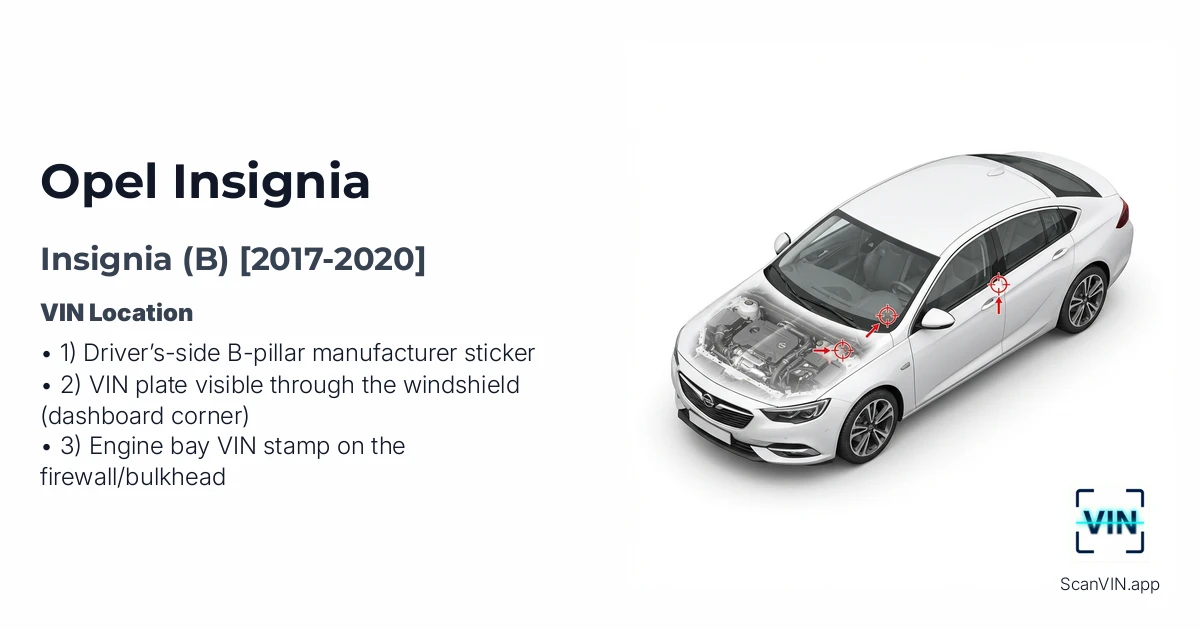 | B 2017 2020 | 1) Driver’s-side B-pillar manufacturer sticker 2) VIN plate visible through the windshield (dashboard corner) 3) Engine bay VIN stamp on the firewall/bulkhead | View details |
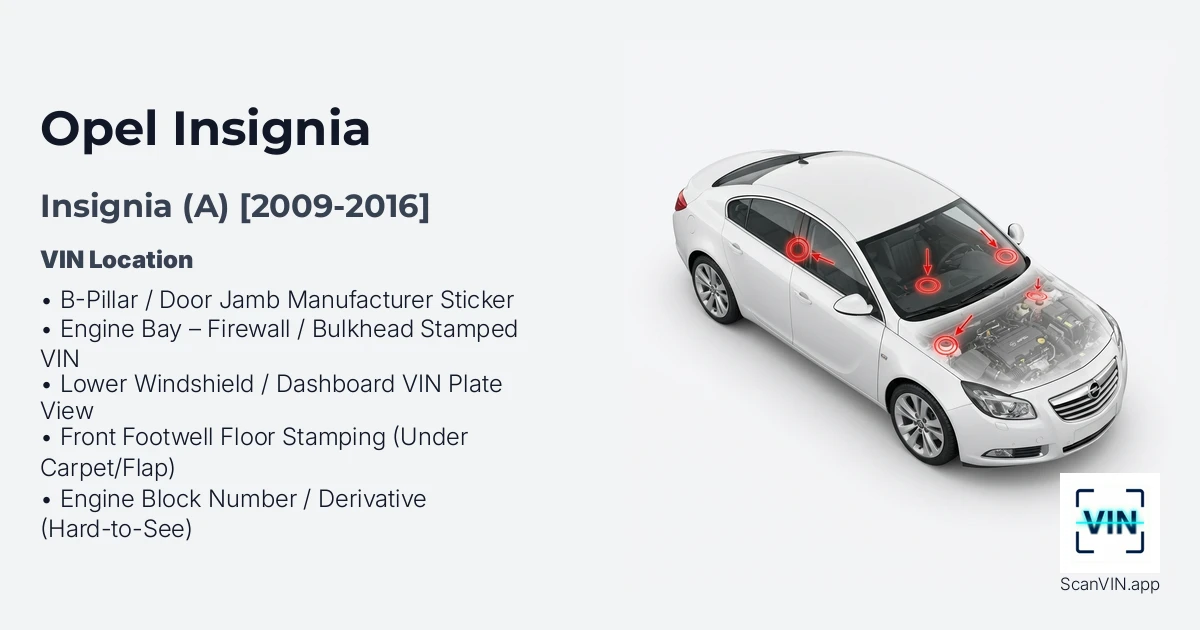 | A 2009 2016 | B-Pillar / Door Jamb Manufacturer Sticker Engine Bay – Firewall / Bulkhead Stamped VIN Lower Windshield / Dashboard VIN Plate View
+2 | View details |
Opel Insignia (B) [2017-2020]
Quick response
Quick Answer: The most reliable VIN location for the Opel Insignia is the driver’s-side B-pillar manufacturer sticker. It’s typically located on the lower B-pillar in the driver’s door jamb, visible as soon as you open the driver’s door. Expert tip: this is the easiest one to read and scan because it’s flat, high-contrast, and well-lit.
This guide covers the VIN (vehicle identification number) locations on the Opel Insignia B produced between 2017 and 2020, so you can quickly verify the chassis number for registration, insurance, or a pre-purchase check.
Chassis Number Locations
1) Driver’s-side B-pillar manufacturer sticker 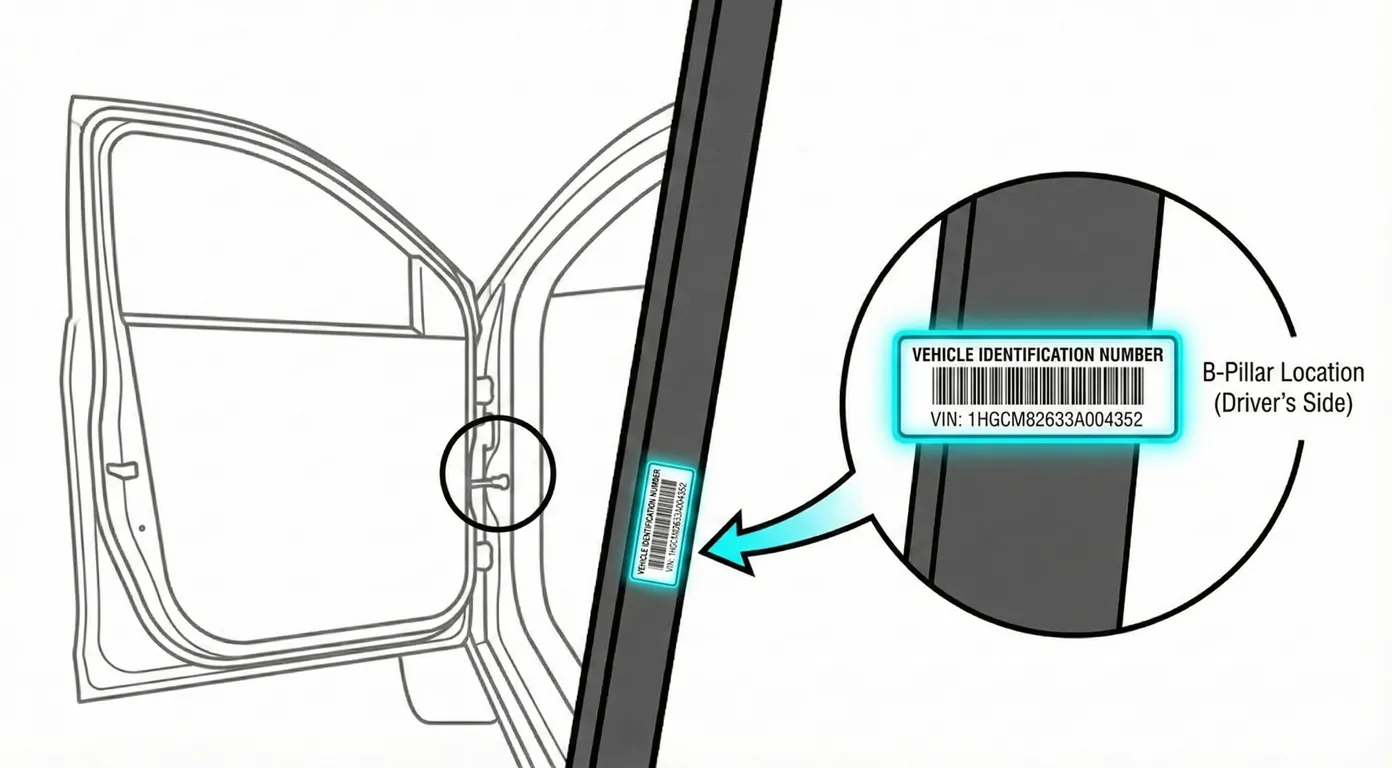
- Where to look: Open the driver’s door and look at the lower section of the B-pillar (door jamb area). You’ll see a black manufacturer label/sticker with the VIN printed clearly in the center block.
- Access: Very Low difficulty. No tools needed—just open the door. Wipe dust off the sticker if it’s dull.
- Note: The inspected car is LHD (left-hand drive), so this is shown on the driver’s side (left side of the vehicle).
- Tip: Because it’s flat and high-contrast, you can usually scan it directly with your phone in one shot to avoid mis-typing characters.
2) VIN plate visible through the windshield (dashboard corner) 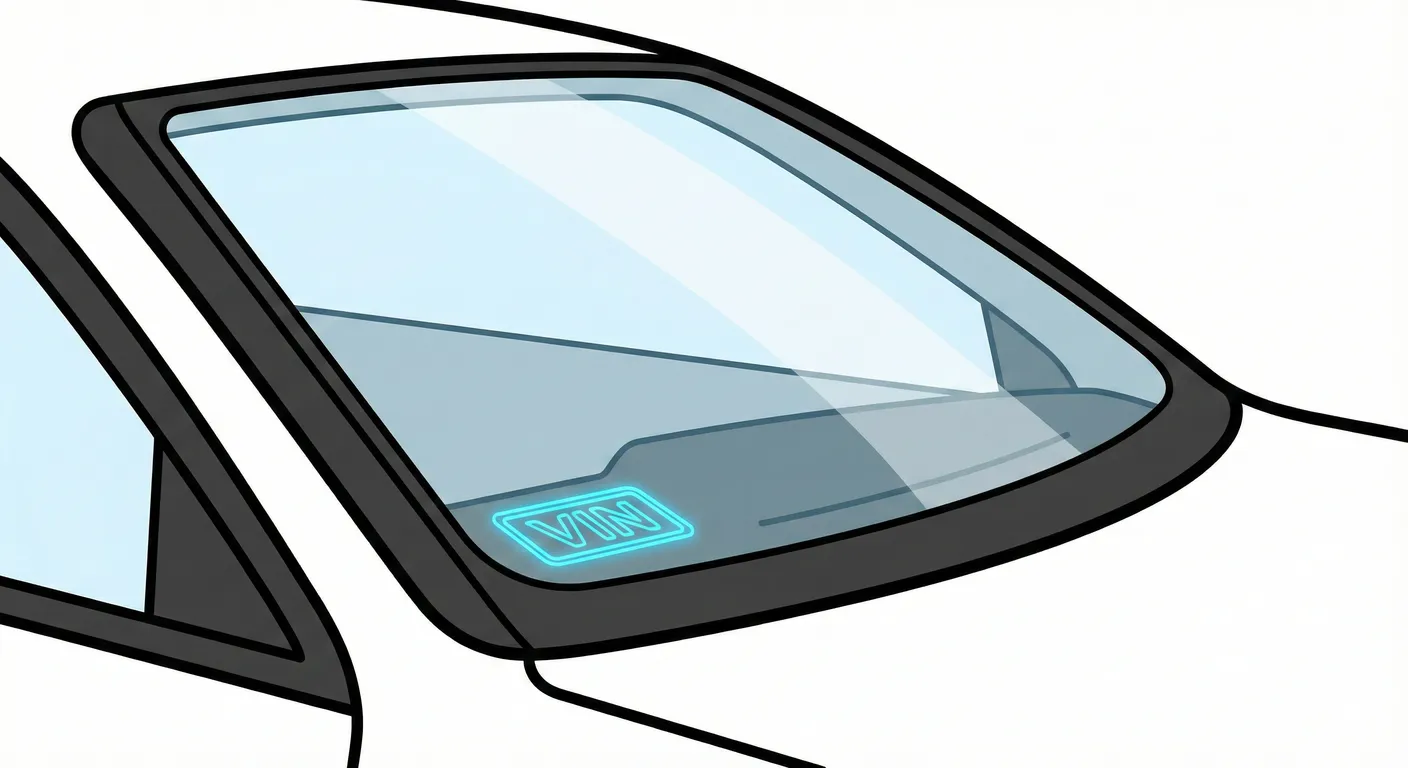
- Where to look: From outside the car, look through the lower corner of the windshield on the driver’s side, where the glass meets the dashboard/cowl area. The VIN plate is embedded in the dash and readable through the glass.
- Access: Low to Medium difficulty. The main issue is glare/reflections on the windshield, plus dirt collecting in that corner.
- Note: On LHD cars, this is shown on the driver’s side (left) at the base of the windshield.
- Tip: If reflections wash out the numbers, change your viewing angle and capture it with your phone using the VIN scanner so you don’t have to transcribe it through glare.
3) Engine bay VIN stamp on the firewall/bulkhead 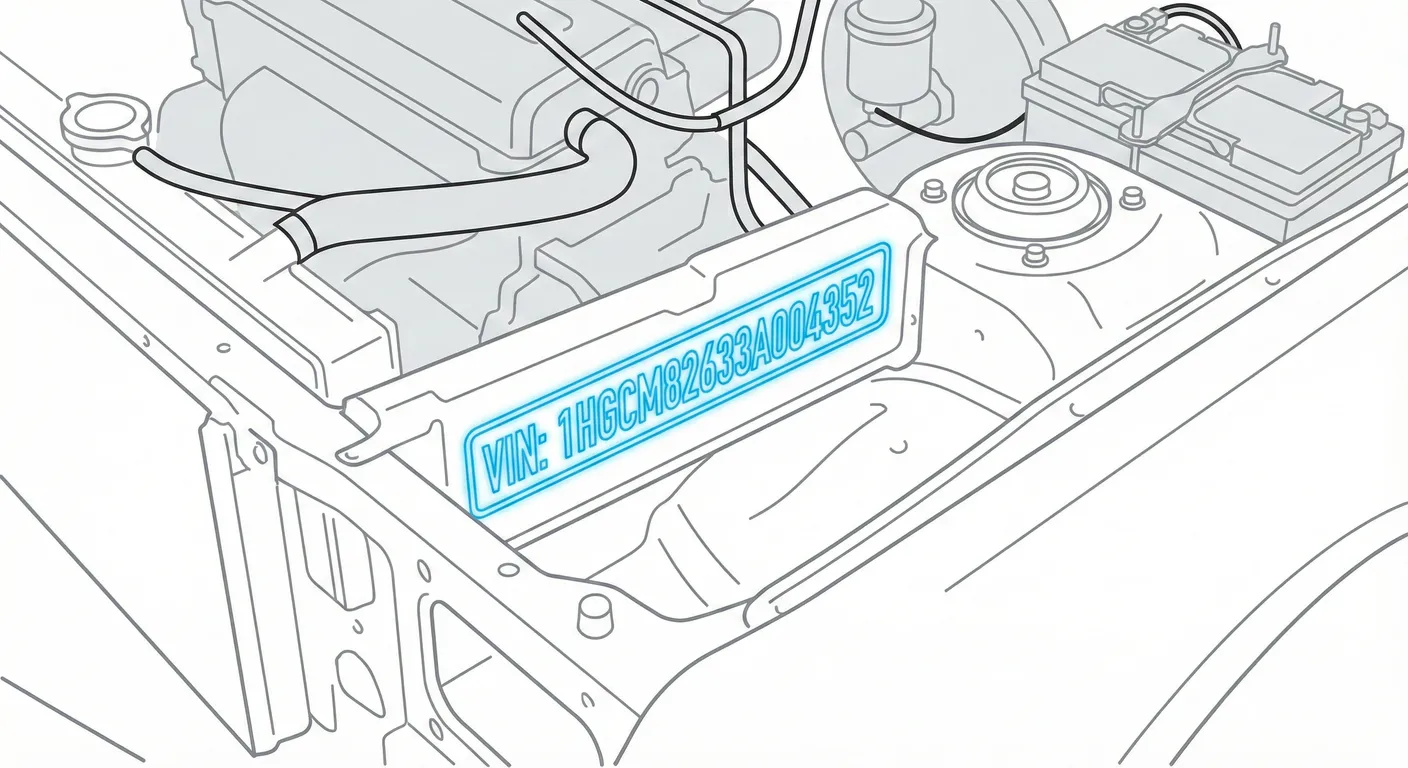
- Where to look: Pop the hood and locate the firewall/bulkhead at the rear of the engine bay, just below the windshield cowl/scuttle panel. The VIN is stamped into the metal on the firewall ledge (slightly recessed and partially shadowed by the cowl/weather stripping).
- Access: Medium difficulty. It can be dark and recessed; grime/dust can fill the stamped characters. You may need a flashlight and a rag/brush to clean the stamp.
- Note: This location is consistent across the Insignia B shown (Sports Tourer and Grand Sport body styles).
- Tip: If the stamp is low-contrast or dirty, wipe it and use High Contrast scanning with ScanVin.app to pick up stamped characters that are hard to read by eye.
Video Guide
Video Tutorial: Opel Insignia B (2017-2023) – VIN Number Location
- A clear walk-around showing all confirmed VIN points: B-pillar sticker, windshield VIN plate, and the firewall stamp in the engine bay.
Common Problems & Troubleshooting
- Windshield VIN unreadable: Glare/reflections or dirt in the lower corner can hide characters—change angle, shade the glass, and clean the corner.
- Engine bay VIN stamp hard to decipher: Dust/grease and shadows reduce contrast—scrub the stamp lightly and use a flashlight for raking light across the characters.
- Sticker vs. stamped VIN mismatch: A damaged/removed door-jamb sticker can be misleading—always cross-check with the windshield VIN and the firewall stamped VIN when verifying identity.
Frequently Asked Questions
Where is the VIN on Opel Insignia?
Check the driver’s-side lower B-pillar sticker (door jamb) first, then confirm it on the VIN plate visible through the lower driver’s-side windshield corner.
Which VIN location is the most important for Opel Insignia?
For quick ID, the windshield VIN plate and the B-pillar sticker are the easiest to access. For identity verification, the stamped VIN in the engine bay (firewall/bulkhead) is the most tamper-resistant and should match the other VIN locations.
Opel Insignia A [2009-2016]
Quick response
Quick Answer: The most reliable VIN location for the Opel Insignia is the manufacturer’s label sticker on the B-pillar (front passenger door jamb on most LHD cars). It’s on a flat, high-contrast sticker low on the pillar, making it easy to read. Expert tip: if the sticker is missing or painted over, verify the stamped VIN in the engine bay (firewall) with a flashlight.
This guide covers the chassis/VIN number locations on the Opel Insignia A (2009–2016), including the easiest sticker location and the stamped “backup” locations used for identity checks.
Chassis Number Locations
B-Pillar / Door Jamb Manufacturer Sticker
- Where to look: Open the front passenger door (for most LHD Insignias). Look low on the B-pillar, near the rocker/threshold area, for a black manufacturer label showing the VIN plus weights/paint data.
- Access: Very easy—good lighting and a flat surface; usually no tools needed.
- Note: On RHD cars (like the example vehicle in the video), the same label may be on the front-left door jamb instead. Use the front passenger side for LHD first, then check the opposite side if needed.
- Tip: Because it’s high-contrast and flat, you can scan it directly with your phone to avoid mistyping long VIN characters.
Engine Bay – Firewall / Bulkhead Stamped VIN
- Where to look: Open the hood. Go to the center of the firewall/bulkhead, just below the windshield cowl. Look for a cutout “window” in the plastic trim/weather strip—the VIN is stamped into the metal underneath. You may need to lift the rubber weather strip slightly to see it clearly.
- Access: Medium difficulty—this area often has heavy dirt/grime, and the hood creates shadows.
- Note: This is a strong “identity check” location because it’s stamped into the body, not just a sticker.
- Tip: If the stamping is dirty or rusty, use ScanVin’s High Contrast AI Mode to capture it cleanly instead of scrubbing until the numbers smear with grime.
Lower Windshield / Dashboard VIN Plate View
- Where to look: Stand outside the car and look through the bottom corner of the windshield on the passenger side. The VIN sits in a small notch/cutout in the dash’s blacked-out area.
- Access: Easy to spot, but readability depends on glass condition and lighting.
- Note: If reflections are bad, try changing your viewing angle from outside (move left/right a few inches).
- Tip: Windshield glare can make “8/B/3” look identical—capture it instantly with the VIN scanner so you don’t transpose characters.
Front Footwell Floor Stamping (Under Carpet/Flap) 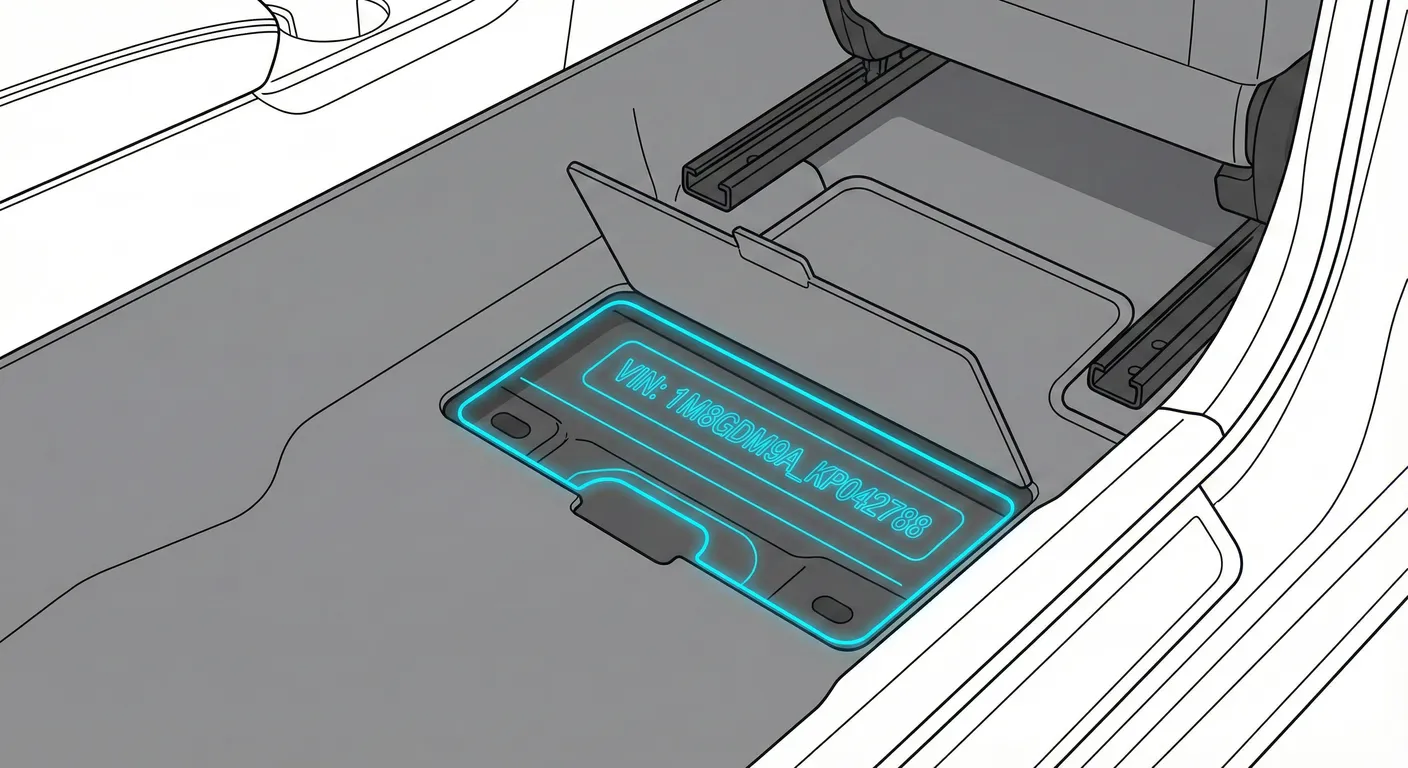
- Where to look: Slide the front seat back and check the front footwell floor for a pre-cut carpet/plastic flap over a cross-member. Lift the flap to reveal the stamped chassis number.
- Access: Moderate—requires kneeling, lifting trim/carpet, and working in a dark area.
- Note: Floor VIN placement can vary by configuration. On many LHD cars it’s commonly on the passenger side, but check the driver side footwell if you don’t find it.
- Tip: Because it’s dark and awkward to photograph, use ScanVin’s Flashlight + OCR scanning so you don’t have to write the stamping down by hand.
Engine Block Number / Derivative (Hard-to-See)
- Where to look: On a flat machined surface on the engine block (often near hot/dirty areas such as around the manifold region). The exact marking is difficult to view without moving hoses/shields on some engines.
- Access: High difficulty—tight angles, heat, grease, and corrosion make it hard to read.
- Note: Treat this as a secondary/confirming mark, not your first choice for a VIN check.
- Tip: If you must read it in a cramped spot, scan it instead of copying it manually to reduce errors when access is poor.
Video Guide
Video Tutorial: Vauxhall Insignia (2009) chassis and vin plate location
- Shows the firewall/bulkhead stamped VIN, the windshield VIN view, and the door jamb sticker on a real-world (dirty) Insignia.
Common Problems & Troubleshooting
- Dirt/rust on stamped VINs (engine bay/firewall): Spray a mild cleaner, wipe, then use a flashlight at a low angle to make the stamping cast a shadow you can read.
- Windshield reflections hide digits: Clean the outside glass and change angle (step sideways) to cut glare before scanning/reading.
- Door jamb sticker issues: Stickers can be missing, damaged, or painted over after repairs—always cross-check the sticker VIN against a stamped VIN location when buying or verifying identity.
Frequently Asked Questions
Where is the VIN on Opel Insignia?
Check the manufacturer VIN label on the B-pillar/door jamb first, then verify using the stamped VIN on the engine bay firewall/bulkhead under the windshield cowl.
Which VIN location is the most important for Opel Insignia?
For quick identification, the B-pillar sticker is the easiest to read. For verification (especially when buying), the stamped body VIN on the firewall/bulkhead is the most important because it’s permanently marked into the chassis.
Don't see your generation?
Try scanning simple VIN code. Our scanner will automatically identify the Make, Model and Generation.
Scan VINNote on Data Sources
Information about VIN location in this model comes from aggregation of official technical documentation (OEM) and spare parts catalogs. Despite careful algorithmic verification, the data is for reference purposes only. Final vehicle identification should always be confirmed by an authorized technician.
See how we verify data and build our database →